I hope you find my writing and business tips and observations useful. My business and blog are dedicated to helping businesses communicate clearly and reach their potential.
Read, and enjoy!Tash

Understanding type cases
Letter type cases or case styles refer to how letters are presented, either as upper case (capital letters) or lower case. It is important for making things easy to read.
Traditional type cases

Originally, writing was all done in upper case or capital letters. The creation of a duplicate alphabet of lower case letters in the Middle Ages made writing faster. In 1439, the introduction of the printing press made the two cases more distinct. Printers had a metal block for each letter that they combined for actually printing. What we know as lower case letters were used more so were kept on the more accessible lower shelf. Capital letters were kept on the upper shelf. Thus, letters became known as upper and lower case.
Upper case
Only capital letters are used. FOR EXAMPLE, THIS SENTENCE IS TYPED IN UPPER CASE.
This is harder to read and is considered to be yelling in modern communications. I strongly recommend this is not used in business communications.
Lower case
Only lower case letters are used. this sentence is in lower case only, not even a capital to start the sentence.
While easier to read than upper case, it is harder for the reader to see the gaps between sentences so ideas blur a little. It can appear ignorant or lazy to not include capitals appropriately.
Title case
All important or functional words start with a capital letter. Here is an Example of a Sentence Written in Title Case – Although Some People Capitalise Every Word Not Just Functional Or Major Words.
My main concern with this is how long it takes to capitalise those functional words! I also find that it looks pretentious and provides no real value.
Sentence case
Sentence case is what we are used to seeing in books, newspapers, websites, magazines, and apps. Most sentences in this blog post are written in lower case letters, with capital letters just for proper nouns like Tash and the first word.
If you aim to use this, even if you occasionally get capital letter rules wrong, most people will find it easy to read and focus on the content rather than the writing and type case.
Modern type cases
With the evolution of content away from purely printed word, some other case styles have developed their own style rules. These cases are only used for specific purposes, rather than in general content, and become more specific for coding and programming.
Camel case
This type case evolved predominantly for nouns and product names where there is a mix of lower and uppercase within a word. It is generally a merging of words, losing the space between them but keeping the capital letters. So MasterCard, PlayStation, OneDrive, and even NaCl (Sodium Chloride or what we know as table salt) are all camel case.
It further developed into upper camel case or Pascal case where every included word starts with a capital letter and lower camel case. In lower camel case (or dromedary case), a lower case letter attached to the start of a word. Common examples are eBook, iPad, eBay and even lowerCamelCase.
Kebab case
This is for website addresses and is not used in general text. Kebab case is written in all lower letters and includes hyphens and slashes. For example, /starting-your-style-guide and /blog/category/monday-meanings/.
Snake case
Not used in general text, snake case is used for naming files. This type case helps identify where a file is kept. Snake case is always in lower case with words connected by underscores. Examples include ‘website_content_review’, ‘annual_report_outline’, and ‘blog_review_schedule’.
Consistent terminology
Do you know what a closed question is?
I’m sure I didn’t learn about open and closed questions until much later, but my children are learning this in primary school. This is a good thing as it can help them communicate socially as well as within their school work.
Closed questions – elicits a simple response. For example, the question “do you like blue or green?” can be answered with one word.
Open (or open ended) questions – give scope for more detailed and complex responses. Open questions such as “why is blue your favourite colour?” or “what do you like about that book?” require longer answers and can lead to a discussion.
Thick and thin questions?
Have you ever heard questions referred to as thin and thick questions rather than open and closed?
The first time I knew of the thin/thick nomenclature was when I saw some work my daughter did at school. I know enough about open/closed questions to figure out what was meant by thin and thick so I interpreted the schoolwork very quickly. And I assumed the children had been taught thin/thick instead of open/closed.
Then I read the schoolwork in more detail.
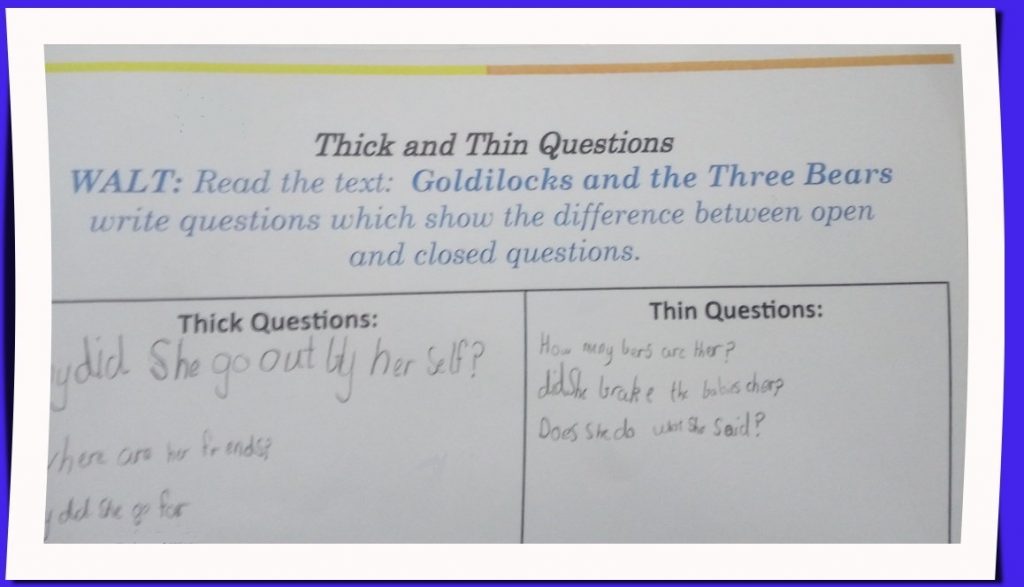
The instructions swap between thick/thin and open/closed questions without any explanation that they are the same concept (and not even in the same order which makes it even harder to correlate the pairs of words). Given that this activity is obviously aimed at teaching children about open/closed questions, surely it would be better to use the same terminology for the one activity.
It’s one thing for me as a professional writer to read these instructions and follow them easily. It’s something else entirely for a seven year old who is grappling with what these terms mean and finding examples of each type!
And my daughter said they were only taught about open/closed questions – she figured it out (and I think she did a good job devising relevant questions in the activity). I’m sure many of her classmates would have struggled if they were left to do this activity just by reading the instructions.
The lesson?
If you start using one term (or set of terms) when writing, then continue using that term throughout.
Even if you explain there are alternatives, stick to one term in your content. For instance, if you are writing about saving money, you may write something like
Contributing to your savings can be done more or less frequently. Contributions, also known as deposits or account credits, will attract interest and thus increase your savings over time. When deciding how much to contribute, you may consider your income, expenses and lifestyle choices.
You may not be writing for children, and your audience may easily figure out your message, but why make it harder to read than necessary? Why risk them not understanding and/or disengaging in your content?
Being consistent makes your writing easier to read and understand, looks more professional and will probably help search engines recognise a keyword in your online writing.

Back to basics on editing
 “It’s not fun to reread everything but you have to edit your work. I’ve written long essays at Uni, thinking they were good, but when I edited them, I found some bits just didn’t make sense. Sometimes your brain takes a little rest and you don’t write as well.”
That’s what my son’s grade two teacher said this morning as she led a class on editing.
learning to edit
The ability to edit what we write is an important communication skill. For instance, if I wrote an invitation for Thursday 10pm, I may be a bit lonely at 10am when no one turn up because I hadn’t checked what I wrote in the invitation.
While it can be much easier to edit someone else’s work as it is fresh to us and we don’t have an expectation or memory of what was to be written, there are many times when doing your own editing is necessary.
Technically, learning to read and write gives us the skills to edit our work (for example, you could recognise ‘siad’ was incorrectly spelt).
However, as I saw in the classroom today, being given direct tasks for editing is an effective way to understand and undertake editing.
basic steps of editing
Each student was given a checklist of tasks to edit a piece of work they wrote last week.
The group I worked with, went through the list item by item to improve their writing. When I edit, I probably do multiple steps at once but doing one at a time is simpler for children. I also think that doing it step by step actually makes errors easier to spot.
So the checklist today was:
- title
- sizzling start
- backfill
- events in order
- does it make sense?
- check capital letters and full stops
- check spelling
Why not follow this list next time you have to edit something?
understanding the checklist
Just because this list uses very specific terms taught at our school (and others!), here are a few tips…
- not everything needs a title, but most writing that you would edit does (including an email subject as a title)
- make the beginning interesting! Primary students are taught to make a sizzling start on a simple level, but your writing should also start with something interesting
- backfill just means an introduction or explanation of the writing. Consider this the all important sentence that answers who, what, where, why and when.
- different styles of writing require differences in content, so you may not always need events to be listed in chronological order – but the order of what you do include needs to make sense in the relevant context.
- at school today, I had the students check each sentence made sense. Some had written ‘first tunnel ball. then octopus.’ which obviously needed to be more like ‘first we played tunnel ball, then played octopus.’
As more literate adults, we can read through the work faster to check for meaning. However, a slow read of each paragraph can really help spot errors.
getting help
I liked that the teacher today actually told the students to get help with editing.
First, she suggested that if they suspected (or knew!) a word was misspelt they could check the spelling by using their dictionary or asking a classmate.
Then, she also suggested that for any sentence they were unsure of, it was ok to say “Hey, Tom, does this make sense to you?” and get someone else’s opinion.
So even if you don’t get someone to edit your writing for you, you can look up or ask for help on specific sections of your work. If the writing is of importance, the editing help is really worth the effort.
Expand on measuring options
So you have a product and customers have to mix it in some way, and you want to make it easy for them to get good results. What are your options for doing this?
This is to follow on from my post on tile adhesive instructions being less than ideal, and I thought I’d explain some ways to make mixing instructions easier for your customers.
Why expand on instructions?

You may not need scientific precision measurements, but clarity is critical in making the right mixture.
Yes, you could copy the tile adhesive company and give very basic instructions. And that would be fine for some of your customers.
Or you could aim to help the majority of your customers with more detailed, clear instructions as they will be happier and get better overall results. And happier customers will come back and/or recommend you to others.
Better instructions could also mean fewer calls to you asking for help, too.
How to give useful information
Depending on your product and audience, you may be able to use one or more of the following options.
- give specific measurements
- give a simple ratio for mixing
- give a range of measurements
- give instructions that allow for varied quantities
Give specific measurements
Obviously, the simplest approach is giving exact measurements like a cake mix packet – ‘add one egg and 1 cup of milk to the cake mix’.
Of course, it is best to avoid ambiguity and use clear measurements. For example, 250ml is safer than 1 cup as non-Australian cups are not 250ml.
Give a simple ratio for mixing
When you have a packet and people are likely to use part of it each time, a ratio can be a handy measurement tool.
For instance, ‘add two teaspoons of fertiliser per 3 litres of water’ can be used by someone wanting 3 or 30 litres of fertiliser. And ‘mix a 1:1 volume of powder and water’ is easy to convert to any quantity of the mixture.
Give a range of measurements
When you provide a large quantity of the product and people are probably going to use it in batches, it is important to give them realistic numbers to work with. For example, no one is going to use a whole box of washing powder in one go so why bother saying ‘tip the box into a 7,000 litre washing machine’?
Even if you do provide a ratio of components, some examples or a range can be very useful for a consumer.
A range could be in a table form:
| powder | water | area covered |
| 1 cup | 2 litres | 1 m2 |
| 2 cups | 4 litres | 2 m2 |
| 5 cups | 10 litres | 5 m2 |
Or as text ‘To cover a large area, mix the entire bag with 6 litres of water; to cover 1m2 area, mix 1 cup with 2 litres of water.’
Give instructions that allow for varied quantities
Sometimes an exact measurement isn’t feasible, but this can be hard for a user to understand.
Instead of saying something like ‘use one to two cups of water’, it is clearer to write:
– add one cup of water and mix
– slowing add more water (up to 1 cup) until the mixture runs as slowly as honey
or maybe you can add notes like ‘Add 1 cup of water and mix. Note that in high humidity or days over 35°C, an additional 1/2 cup of water may be needed.’
Take care with huge claims!
It will be my son’s birthday soon and we’ve been looking for a present for him – he adores Lego so we want to get him some miscellaneous bits to play with as well as the sets he already has.
Our search moved onto eBay where we found some listings for bulk lots of Lego.

My son has a lot of Lego – yet I wouldn’t describe it as a huge bulk lot of Lego!
A few items suited what we wanted and we placed some bids.
Other items didn’t suit so we moved on.
A number of items listed as ‘huge bulk lot’ (yes, there were more than four or five of them! And all seemingly from the same seller) amazed us 🙂
Over promising doesn’t get the sales
What does huge mean? It is something of great size or quantity.
And what does bulk mean? Again, it is about size and, in the context of purchasing items, means a large quantity of something.
So when I look for bulk Lego, I expect hundreds of bricks or even kilograms of Lego.
I don’t consider six wheels or 13 small pieces of Lego to be a ‘huge bulk lot’. Yet the aforementioned seller apparently thinks differently to me!
Needless to say, we’re not interested in buying tiny ‘bulk’ packs of Lego.
Calling his packs of Lego ‘huge bulk lots’ may have attracted people wanting bulk lots – but it wouldn’t be bought by them.
While people after smaller packs of specific bits of Lego wouldn’t necessarily search for bulk packs.
Either way, the seller isn’t using a smart strategy in my opinion.
Over use of adjectives
Adjectives can be useful for providing information and making writing more interesting.
Yet there are two details to remember…
- the adjectives need to be honest and actually describe the noun(s) or the writing just loses credibility
- too many adjectives is not helpful. People start to glaze over when there are too many together – I know that in my busy life, I don’t have time to wade through lots of meaningless adjectives to find out the information I really want so I’m less likely to read something that appears hyped up.
How’s your business – do you add adjectives to hype up a product or keep them to a meaningful minimum? Maybe you have tested it and found lots of adjectives sells more – if so, I’d love to hear your experiences!
Grammar makes for a busy pharmacist!
Last night I saw a TV ad for some (legal) drugs for children’s colds.

Pharmacists must pay careful attention to details…
It was nothing particularly out of the ordinary until I read the fine print at the end, which was grammatically poor.
For children under two years, contact the pharmacist.
Obviously there is only one pharmacist we could ask – must be a mighty busy person though if we only have one in Australia!
The grammar…
In short, using the word ‘the’ implies there is one so we correctly write ‘the Prime Minister is visiting the Governor General’.
When used as an article for a noun, the word ‘the’ signifies that the relevant noun is either unique or somewhat special. For example, the Tour de France is the long distance bike race – obviously, there are other long distance bike races but the Tour De France is the ultimate and best known one so using ‘the’ emphasises its importance.
So the ad would have been better telling us to contact ‘your pharmacist’ or ‘a pharmacist’.
* Image courtesy of 123rf
also comes after
Reading and editing a document recently, I came across the following text as the first paragraph in a new section of the document:
We will also deal with your request for access…

‘Also bring an apple’ comes after ‘bring pen and paper’ or else ‘also’ makes no sense.
So today’s Monday Meaning is for one word instead of a pair of words.
Also [adverb]: as well as, too, in addition, besides
Please bring pen and paper. Also bring a snack.
Getting back to the example above, it is wrong because ‘we’ can’t ‘also’ deal with a request if ‘we’ aren’t already dealing with something for you.
Words like also and too must follow, or come after, something rather than being the first item in a list.
Facebook ads – short but important
Proof reading is important – even for short and (relatively) simple things like a Facebook ad.
A Facebook ad that needs proof reading
Unfortunately my screenshot didn’t work (and the ad hasn’t shown again since!) but I saw an ad this morning that seriously needed some help…
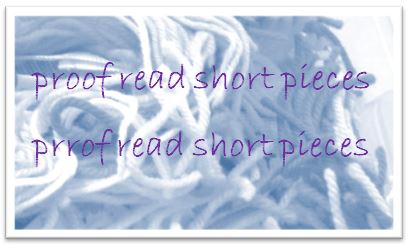
Even short pieces of text need to be proof read – or risk embarrassment
The heading of the ad was “New year. New hom.”
For a major company involved in real estate sales, you’d think home is an important word to get right.
I’d also have expected a company of that size to have a process of checking and approving ads before they go live – a one-person business is often at bigger risk of such errors because it is harder to correct your own writing.
The body of the ad included “but hurry – offer ends 28 February!”
Perhaps they meant hurry into your time machine?
That isn’t necessarily a proof reading error (unless they actually got the date wrong!) as it may be an incorrect setting on when the ad is to be run. Either way, attention to detail can have a big impact!
Proof reading matters…
We all do it – we write something and assume it is written exactly as we meant it to be.
But between typing mistakes (typos), thinking faster than we can type and actual spelling/grammatical errors, it is easy to have text that is not exactly what we wanted.
So we need to check our writing for errors. ALL our writing, whether short or long, whether technical, legally required or marketing, whether online or offline. It’s that simple!
And the key proof reading rules are to get someone else to check it and leave some time between the writing and proof reading.
Oh, and don’t rely on spell check to find all your errors, either. For example, in this post I typed ‘won’ instead of ‘own’ and a spell check would have accepted that as fine.[Tweet “Leave time between writing and proof reading, and don’t rely on spell check…”]


Keep it simple…
Simple but clear – this image tells a story without trying to impress or be more than it is. This makes for good communication.
The purpose of the written word is to communicate.
Sometimes that does include some complexity but I strongly believe it should be kept as simple as possible. Why make people work hard at understanding and increase the risk of misunderstanding?
I recently came across the following:
Email us to inform us about updates regarding your personal information.
And it struck me how some people try to impress and seem ‘professional’ by using complexity when it really isn’t needed. In the example above, why not just write:
Email us with any changes to your contact details.
Recent Comments