I hope you find my writing and business tips and observations useful. My business and blog are dedicated to helping businesses communicate clearly and reach their potential.
Read, and enjoy!Tash
If you’re like many people, you put them in the recycling (or normal) bin – possibly without even reading it first.
This is annoying because
it is a waste of paper and thus a burden on the environment
it is a waste of money to print and mail the documents – and guess who pays for that waste?
Going digital
A few years ago, legislation changed so that financial instructions can send some disclosure information electronically. That could be as an email attachment, an email linking to an online resource or even an SMS containing a link.
However, the super funds and banks could only do this if you consented to getting it electronically.
New digital rules
Under a new ASIC guidance, financial organisations in Australia can send disclosure materials to their customers/members by default.
That is, they will need to notify customers/members that “certain information will be provided by {explain electronic method} unless you opt out within 7 days of this notice.”
So once such organisations set up this notification and opt out system, we can all expect to receive such notices and then get fewer hard copy disclosure materials.
Going back to my first question – do you keep hard copies of such materials? If so, will you opt out of electronic communications now there is a clear choice?
If you were a financial organisation, would you swap to sending digital communications instead of hard copies?
I just visited a blog for the first (and probably last!) time.
As soon as I got to the URL, a pop up opened to promote something I assume they get a commission or payment for. There was a x on the pop up so I was able to close it fairly easily at least.
I hate pop ups at the best of times (and am annoyed that many get past pop up blockers but that’s another story!) so it doesn’t make me like a site when I get a pop up so quickly. But I sigh and move on.
People learn to block out too much noise and refuse to be distracted.
Frequency of pop ups
On this particular site, I closed the pop up and then clicked on a link to see the most recent blog post.
As soon as the blog post opened, so did another pop up.
As soon as the about us page opened, so did another pop up.
As soon as the registration page (clicked on by mistake!) opened, so did another pop up!
Seeing the same pop up that many times is NOT making me more likely to click on it let alone spend money on whatever is being advertised.
Topics of pop ups (and other ads)
I understand that running a blog has costs and people want to make a bit of money back from their blog if possible. Ads and affiliate links are one way to cover some blogging costs.
But surely it’s more effective if the ads are aimed at the target audience of the blog?
In my example above, the site is about cooking but the pop up was about web hosting.
Obviously, some people are interested in both cooking and running a website. But can you assume most people looking up recipes and cooking tips will be interested in hosting a website?
I think a pop up for cooking books, online shops for herbs and other ingredients, or even online retailers of cooking tools would interest more of the blog’s visitors. And thus earn the blogger more money – or the advertiser more relevant exposure.
The lesson learned?
Ok, I already knew this but the lesson from my example is to control any pop up advertising on your blog or website.
only show the ad a few times – if someone says no after that, they’ll probably always say no
make your ads relevant to your audience. If not immediately apparent why it should interest that audience, make the ad itself provide a link.
So what do you think of website pop ups?
Do you use (and hopefully control) pop ups on your site? If so, what response have you got from them?
It’s easy to be reminded that the look of your blog can affect readership. But there is one little design tool I hadn’t thought much about – I wonder if I’m the only one?
I came across an old blog post on what appears to be a prosperous blog. It was an interesting post but very much an introduction to a topic so I was interested to read more. In fact, the post ended with a comment like “Next time I’ll tackle how to do this”.
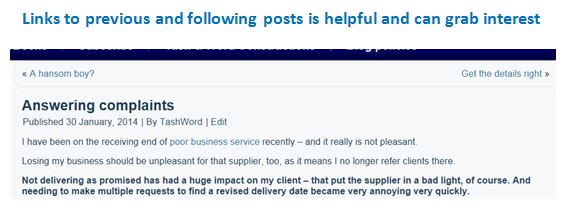
Next post is very handy
I couldn’t find the next post on the topic.
The blogger didn’t go back and add a link after he wrote the next post (assuming he actually he did write it!), didn’t give the title of the new post in the first post and the blog layout did not include a ‘next post’ or ‘previous post’ link on the page.
I take the next post link for granted really and don’t think about it much. Does your blog have it?
Do you find it strange when blogs don’t have such navigation links?
Many times I read a blog and ignore the next/previous because I just read one post or I want to read about a topic so use the search function rather than read in sequential order. Yet today I discovered a very important use of this navigation tool.
From now, I value the next/previous post link much more and would never publish a blog without it. Would you?
One policy included the following (slight edits made to protect that business):
Disclosure to overseas recipients
We may disclose your personal information to overseas parties. If we disclose your personal information to overseas recipients, we will do so in accordance with our Privacy Policy and the Privacy Act 1988 (Cth).
Circular links don’t really help people follow the information flow
Under new laws, you must specify if any data will be stored outside of Australia so this section is necessary. But I don’t find it particularly helpful to be told to read their policy to find out if my data goes overseas – especially as I am already reading their policy…
make references useful
never refer back to the same document (a different section of the document is fine, of course) as it is circular and meaningless
give enough information to make the reference easy to follow up on. For example, ‘refer to the product section of our website’ or ‘see page 6 of the member handbook’ give clarity
give some idea of what can be found at the reference so people can judge if it is relevant to them. It doesn’t have to be a long list, but some guidance helps – ‘details on widget sizes’ or ‘widget care instructions’ or even ‘background research about widgets’ is more useful than ‘for more information’.
International Women’s Day on 8 March – what does it mean to you?
International Woman’s Day (IWD) is on Saturday 8th March. It is both a celebration of women and an acknowledgement that many women are living difficult lives.
In some countries, IWD is a public holiday (at least for women) and is similar in importance as Mothers Day.
While it is not a holiday in Australia, you can choose to make it important – or simply acknowledge that it is important to many of your customers.
Celebrating IWD
Some of my ideas for celebrating IWD as a business are:
treat your staff to breakfast or morning tea – even if your staff consists of you and a pot plant!
get the males to do something nice for the women they work with (obviously this requires the men to be willing to participate!) Maybe they bring in food for morning tea, make the tea/coffee all day or ‘man the office’ so the women have a longer lunch break
offer specials or extras to female clients for the day/week/month
encourage women to take an interest this month, especially if you industry is not seen as particularly female-friendly or of interest to women. For example, I’ve helped AvSuper prepare information about super for women; a mechanic could run a basic car maintenance course for women; local tradespeople could teach women to do minor repairs through a class or articles in the local paper
put up a poster in the office/shop or add a banner to the website to acknowledge women – it could be generic or somehow relate to your business
do some fund-raising during March with the proceeds going to a women-centric organisation
donate x% of March profits to a women’s cause
send an email or card to your female clients thanking them for what they do (and for being your client of course!)
sponsor a local activity or group participating in IWD – schools and sporting groups in particular may appreciate this
What ideas have you considered for your business?
Have you been inspired by another business’ involvement in IWD? What did they do?
There are a number of sayings/clichés around with the same basic message of doing things too fast can lead to errors and actually take more time.
Slow and steady wins the race
A stitch in time saves nine
Haste makes waste (or more haste, less speed)
For fast acting relief, slow down (Lily Tomlin)
And like all clichés, there is a lot of truth there – we’ve all faced the hassle of going back and redoing something we rushed the first time (or paid another price for rushing).
Uninterrupted focus
Did you know that the maximum time an average worker gets to focus uninterrupted on tasks is 11 minutes? That’s according to a University of California study, anyway.
11 minutes is nothing! It says a lot about the fast paced world we’re living in. And says a lot for behaviours like only checking emails at certain times of the day to avoid constant distractions (add in the same rule for checking social media, answering phone calls, listening to office conversations and so forth).
Even on the go, checking messages means we get no break from disruptions
The study also stated that after 20 minutes of interrupted work, people are more stressed, frustrated and feel they have a heavier workload.
Interestingly, in a follow on study run Carnegie Mellon, tests showed that after the first interruption, people do adapt a little and can cope better with subsequent interruptions. But interruptions and the threat of interruptions does reduce the effectiveness of the brain.
Are you working in a highly distracting environment? Are you aware of it stressing you?
Working from my own office, rather than in a corporate office with many people around me, probably means I tilt such averages well past 11 minutes. I do enjoy the fact that I don’t hear colleagues chatting around me, nor their phones ringing and am not distracted by people walking past my office all day.
Of course, I do have young children who are quite capable of interrupting me, too! However, between other people keeping them entertained and choosing my working hours, I minimise that issue.
I set myself work sessions where I only check emails if I need to reference something and let the answering machine manage my phone calls (and enjoy it when marketing calls are filtered!) So I do get periods of focus – and I usually get a lot achieved in those sessions, too.
Doug Keene, Vice-Director of an air-logistics complex trying to reduce employee distractions, said multi-tasking isn’t necessarily a good thing. “When you are focused on just a few things, you tend to solve problems faster. You can’t disguise the problem by looking like you’re really busy.”
At a recent conference, Andrew May ( a performance coach), discussed these results and how stressful they are on people. He gave the following ideas and suggestions {paraphrased and added to by me!}:
slow down – focus instead of trying to do so many things at once
take some time out as ‘enforced isolation’ so your brain can just focus on one thing for a while – it makes you productive and can be quite peaceful. May recommends a few hours a week, at least, and to plan it for high energy times
find a balance with recovery time to counter the stress. A five minute lunch break at your desk is not going to make up for five hours of interruptions – you need to find ways to recharge regularly.
have some electronic free time in the evening before heading to bed so your brain can quieten before you try to sleep. You’ll end up with higher quality sleep. May suggests 45 minutes before bed you have no electronic interruptions and no caffeine; and taking a lunch break of 15 minutes without a mobile.
What can you do (or do you do) to help recover from stressful working conditions?
Do you find your productivity is clearly matched to times you do and don’t take recovery time?
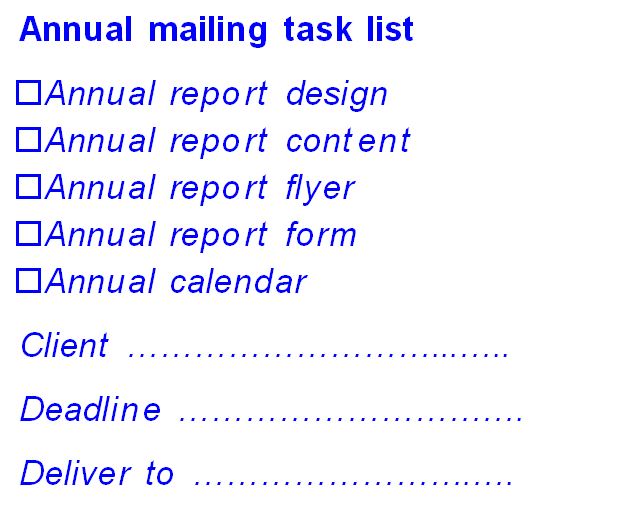
An annual report and any inclusions all form one annual mailing project.
Does this equate to three separate projects, or three parts to one project?
It is a good question, and I can see a temptation to treat them as two or there projects. Maybe you outsource the big project (the annual report) but figure you can manage the smaller ones yourself. or maybe you want to outsource to different people so the inclusions don’t distract from the annual report and vice versa.
However, I consider them to be aspects of one project and like the idea of them being managed as such. I usually mange the inclusions along with annual reports for clients, even if it is just a review and feedback on an existing document.
why consider them as a single project
Treating the annual report and any inclusions as one project works because
they all need to be prepared by the same deadline and delivered to the same place for processing and mailing
the various elements of the annual report mailing are linked (as they are received in same envelope) so you want consistency and to them to complement each other which is much harder to manage if created independently of each other. Even if all match the style guide, any themes and layout options may not quite fit together
in terms of time management, I find I can work on one piece while another is with the designer or being reviewed by my client
any images can be managed so they are only used once or duplicated in every item (as best suits the situation)
it is easier to make references between the items. For instance, the annual report may state ‘we’re launching a new product – to find out the prices, see the enclosed flyer’. This is riskier when you can’t be sure what the other items actually include – if the flyer doesn’t include prices, the annual report reference looks silly.
Have you ever separated the annual report preparation from the inclusions preparation? I’d love to hear your reasons and the results of your effort, so please add your experiences in the comments below!
If a customer has a question, they want you to answer it – and preferably as soon as possible so they can move on to the next step.
Answer potential customer questions to get more customers
Look at your website, brochures, social media profiles and other written messages – do you answer customer questions?
Smaller documents can only answer a few questions, obviously, but make them important questions (like how to contact you for further answers!)
Scary questions
Some businesses are scared of people asking a certain question – or act that way anyway.
Why not stand out by being the brave business? It is honest and gives customers fewer things to worry about because you have answered their questions.
And it gives you a chance to make things more positive, too.
So a dentist website can include “will it hurt? Well, yes it might but we’ll warn you and do whatever we can to minimise it.”
Here are some more industry specific examples…
personal trainers: ‘do I really have to work out in between visits?’ ‘Only if you want the best results!”
accountants: ‘am I going to have to dig out all my old receipts?’ ‘I’m afraid so – the more receipts we get, the more we may be able to get back for you at tax time!’
editors: ‘will you really point out all my spelling mistakes?’ ‘Yes, that’s what you’re paying us for – but we promise not to make you feel bad about any of them!’
online shops: ‘do you charge postage and delivery?’ ‘Yes we do. We decided to charge official postage rates rather than increase the prices of everything to cover delivery.’
Do you answer any potentially negative questions in your materials? How have clients responded to those answers?
If you want some ideas on what questions customers may silently being asking – and how to answer them nicely – then contact me soon so we can help your customers find what they need.
On one hand, you may wonder why not just put all the information into the annual report itself and just send that. It’s a fair question, and certainly should be asked about each individual item you are considering adding to the package, but it doesn’t exclude everything.
Saving money, ability to add forms and marketing are just some reasons to have annual report inclusions.
Some reasons to add other items include:
some things are too hard to incorporate into the annual report, such as long forms you need completed and returned
some items are worthy of keeping visible which is a bit hard to do if it is in the middle of an annual report – things like an event calendar or a reference list or flow chart
a loose flyer may be looked at, and then read, whereas an annual report may just be filed away (including in the bin!) without actually viewing any internal pages
if something needs to be sent at a similar time as the annual report, putting them together saves money (in envelopes, postage and handling) and is generally less annoying for recipients, too
it is a marketing opportunity as you are already contacting those people so at no extra cost you can make more of an impact (no extra mailing cost that is!)
Of course, it is very important to not overdo it, too. Nobody wants to open an envelope and have sheafs of paper fall out at them!
Any more than three or four inclusions would set off alarm bells for me and I could carefully reassess the value of each inclusion before sending so many items. Too many items in the package distracts, too, so the impact of each would be diminished.
How many inclusions would you find too many as the recipient of an annual report? Have you ever received a ridiculous number of items in a package from a business?
Pretty much anything could be added to an annual report, but the most common examples of annual report inclusions are:
a covering letter
a flyer about special offer or promotion (even if promoted in the annual report, a flyer can stand out and may stay on a desk longer)
a flyer to launch new service/product
a form to collect information on something promoted in the annual report
a form to support a usual product to order (that is, if many people buy your product at this time of year or when reminded, give them a reminder! Also very useful for services that are often done annually.)
a form to register interest in an upcoming event or change
annual statement for members
information about an upcoming major change or event, especially if there are regulations about how that information is to be presented or it needs to be personalised to each person
some sort of marketing item, such as a calendar, notepad or magnet, that will stay visible even when the annual report is filed away
perhaps a marketing based magazine although that seems pretty pointless to me as all that could be incorporated into the annual report unless you have a periodic magazine due out then anyway.








Recent Comments